Using the 3CX call queue
We have Updated the Incoming calls to be managed by a call Queue, you are part of the call queue here some instructions of changes for you.
Call queue members are called Agents.
The Queues distribute calls to agents. The Queue is setup to ring only one phone at the time.
To Receive calls as an agent your status must be available and you must logged into the call queue during business hours.
You have several ways to log in and out the call queue.
3CX Web Client
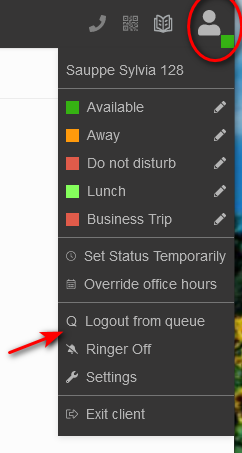
The user can select “Login to queue” and “Logout from queue” by clicking on the user profile photo. In the drop down list select log in to Queue or log out of the Queue.
Mobile App
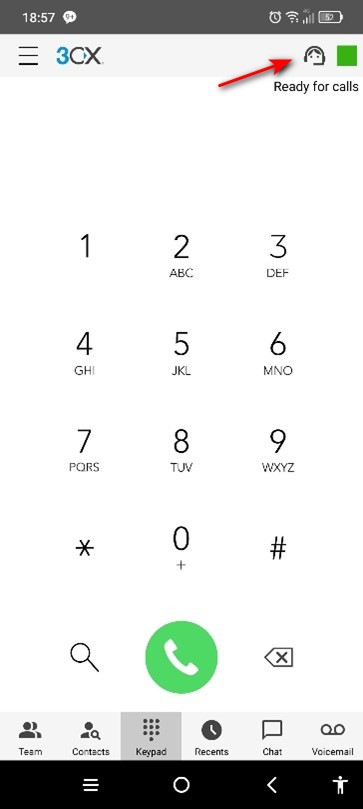
To log in and out of the Queue click on the Head Symbol next to your Status colour (green in photo).
iPhone: the Symbol will be in a blue if logged in and black if logged out of the queue.
Android phone: the Symbol will be in a black if logged in and grey if logged out of the queue.
Desk Phone BLF button
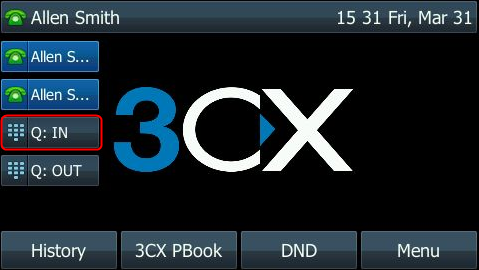 On the Desktop IP phones we will configure BLF keys to login and logout. You will hear an audio confirmation that “This extension is logged into the queue”. You can also log out from the queues using a separate logout BLF button followed by an audio confirmation.
Automatically based on the User’s Profile Status
An agent can be automatically logged in or out of queues, depending on the user’s profile status. For example, when the agent is “Available” the agent will be logged in to the Queues automatically. When the agent chooses “Away” or “Do Not Disturb” the agent will be automatically logged out from the queues.
!!! note If you log out manually if your status is available auto log in our out won't work until you log back in the call queue again.
Queue managers, admin staff can login / logout On behalf of
The login and logout can also be done on behalf of the agent, by the assigned queue manager(s). Agents who are not queue managers can only log themselves in and out of queues.